Yahoo Mail Mailroom is independent · not affiliated with Yahoo

Stop paying rent for ghost email! We are privacy first.

Yahoo cut free storage to 15 GB in the UK and EU. Go over it and you can lose the ability to send or receive email until you delete mail or start paying monthly. Mailroom shows you what is safe to clear first, on your own device, before you pay anyone anything.

no card or subscription required

Windows. No card to start. Nothing is sold on this page — if you decide it was worth it, you buy inside the app.

14-day trial or 10 MB deleted, whichever comes first buy one year, one-time fee no subscription
One real mailbox: 32.7 GB before, about 11 GB after. Mailroom found 21.7 GB safe to clear. Mailboxes differ — your own history will give different numbers.
From the person who built it

That mailbox is mine.

Yahoo told me I was over the limit. I started clearing my mailbox, then an hour later I thought — hold on. What if instead of clearing it, I did the opposite? I put the cleared mail back from the Trash on purpose, because I wanted to see exactly what Yahoo does to an account that stays over, and what it would cost me to give in and pay monthly instead. That is Yahoo's own Trash, not a Mailroom feature — Mailroom does not restore mail. This is how Mailroom was born in my mind, and then I started drafting the product.

The numbers shown on this page are the same mailbox at different points. The screenshots below show it at 15.4 GB, over the 15 GB limit. The video shows it at 32.7 GB, after I put the mail back. One account, one year, two readings.

Initially the KeepSafe engine could identify about 2 GB of mail we could safely delete. We worked hard and improved it — a bit more, then more, then more again.

Mailroom now found 21.7 GB of that 32.7 GB safe to clear. And I have not paid Yahoo a single penny for storage — I have years of room left.

— Mailroom author

The notices

Yahoo will give you a date. Then it moves.

Yahoo gives you a date. Mine said 29 July in one banner and 22 August in another, on the same account in the same week, and an email called it a final reminder. Whatever yours says, the arithmetic does not change: clearing the junk is cheaper than renting space for it.


Yahoo Mail banner: Your mailbox storage is full, 102.7 percent, 15.4 GB of 15 GB. Upgrade for more storage or free up space within the next 30 days; if your storage is full after 22 August you will not be able to send or receive emails. Buttons: Add storage, Manage storage.
“Your mailbox storage is full — 102.7%, 15.4 GB / 15 GB.” Free up space “within the next 30 days”, and “if your storage is full after 22 August, you won’t be able to send or receive emails”. Yahoo’s offer is Add storage or Manage storage. Real notice from a personal Yahoo account, July 2026. Mailroom is independent and not affiliated with Yahoo.
Yahoo Mail banner: Your mailbox storage is full. Upgrade for more storage or free up space within the next 15 days; if your storage is full after 29 July you will not be able to send or receive emails. Button: Add storage.
The same account, the other interface: free up space “within the next 15 days”, full “after 29 July” and you lose send and receive. The first banner counted 30 days, to 22 August. Real notice from a personal Yahoo account, July 2026. Mailroom is independent and not affiliated with Yahoo.
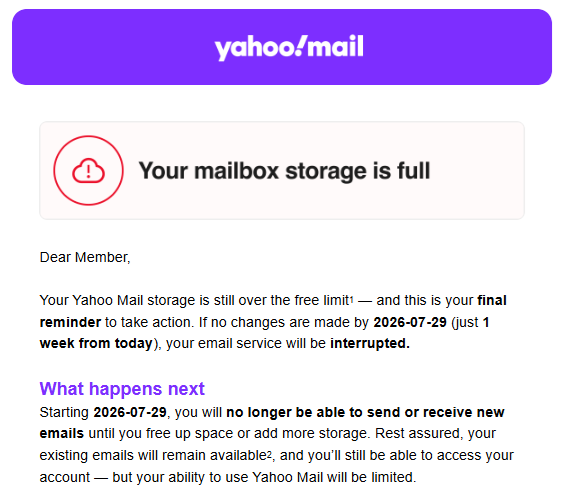
Email from Yahoo Mail headed Your mailbox storage is full: your Yahoo Mail storage is still over the free limit and this is your final reminder to take action. If no changes are made by 2026-07-29, just 1 week from today, your email service will be interrupted.
“This is your final reminder… if no changes are made by 2026-07-29 (just 1 week from today), your email service will be interrupted.” Sent while both banners were still counting down — one of them to 22 August. Real notice from a personal Yahoo account, July 2026. Mailroom is independent and not affiliated with Yahoo.

Act on the date in your own mailbox, not on ours.

Runs on your device
local-first scanning
No card to start
trial is auto-provisioned
One-time yearly licence
not a subscription
Review before delete
you approve every cleanup
How it works

Four calm steps. You stay in charge the whole way.

No bulk-deletion roulette. Mailroom scans, shows you what is taking space, and waits for your go-ahead before anything is removed.

STEP 01
Connect your Yahoo account
Sign in with an app password. Mailroom never stores your main credentials, and nothing is deleted at this stage.
STEP 02
Scan and review
See where the space went — by sender, category and age — with the bulk and promotional mail that is safe to clear surfaced for you.
STEP 03
Delete with confidence
Approve a cleanup and watch the space come back. Mail goes to Trash first by default, where your provider’s own retention applies.
STEP 04
Upgrade only if you want to
The free trial is a real demo. Keep going with a one-time yearly licence — or simply stop. No subscription either way.
KeepSafe engine

Your mail never leaves this device. Scanning, sorting and deleting all happen on your device. What does leave is small, content-free, and listed in full — every channel, right here.

Privacy-conscious by design. KeepSafe triages email using message metadata — the envelope: sender, size, date, and attachment names, types and sizes. Never the message body, never the file contents, and never by shipping your mailbox to a server to be read.
Built to minimise what leaves your device. We never see your messages, senders, subjects or folder names. Those stay on your device.
You stay in control. KeepSafe surfaces what is safe to review and clean up. The decision to delete is always yours.
Why Mailroom

A careful tool for a frustrating problem.

Mailroom is built around outcomes, not features — reclaim space, reduce clutter, and trust every deletion.

Review before delete

See exactly what goes — before anything goes.

Every cleanup is a list you can read: who the mail is from, how much space it takes, and why KeepSafe thinks it's safe to clear. Uncheck anything. Nothing is removed until you say so, and mail sent to Trash stays there under your provider’s own retention rules.

Reclaim space
Get back under your limit
Find the bulk and promotional mail quietly eating your quota, and clear gigabytes in one reviewed pass.
Reduce clutter
Years of noise, sorted
Group by sender, category and age so the worst offenders are obvious — instead of scrolling forever.
Stay safe
Recoverable by default
Cleanups go to Trash first, under your provider’s own retention rules. Permanent removal is a separate, deliberate choice.
No pressure
No subscription
A one-time yearly licence keeps you going. Nothing renews silently, and nothing nags you to upgrade.
Honest tooling
Slow delete, told plainly
Providers throttle bulk deletion, so Mailroom is honest about pace and shows real progress instead of a fake spinner.
Plain language
No jargon, ever
No header strings, no protocol acronyms. Just clear words about your mail and the space it's taking.
Pricing

Try it free. Then pay once for the year.

You pay once, for a year. Yahoo’s answer to a full mailbox is rent — billed every month, for as long as you keep the mail, and it does not remove a single dead newsletter. This is the other answer.

Free trial
Start with a free 14-day trial
Whichever comes first. Free scanning and enough deletion allowance to clear real space and see the difference.
LENGTH14 days of full access
ALLOWANCE10 MB of deletion
PAYMENTNo card required
Download Mailroom
Single
1 ACCOUNT · 1 YEAR
£6.99
One-time, for the year
  • Unlimited scanning & cleanup
  • One mailbox — Yahoo today, more providers planned
  • Review before delete & receipts
Get Mailroom
Family 6
6 ACCOUNTS · 1 YEAR
£14.99
One-time, for the year
  • Everything in Family
  • Up to six accounts
  • Best value per account
Get Mailroom

There is nothing to buy on this page. Download Mailroom, run a scan, clear a first slice free — and if it was worth it, the purchase happens inside the app. One year, one-time. No subscription, no auto-renew, no card stored by us. Prices are in GBP and these are the prices: there is no introductory rate and no countdown.

Future-proofYahoo today
Buy by accounts, not by provider
Every licence is counted in mailboxes. A Family licence covers three, Family 6 covers six — useful if you are tidying up for other people in the household as well as yourself.
What you pay forOne year
No metering after you buy
Your licence covers a year of scanning and cleaning, as often as you like. There is no metering after purchase and nothing to top up.

Yearly licence · one-time purchase for the year · not a subscription · prices in GBP.

Scope & roadmap

Yahoo first — on purpose.

We’d rather do one provider properly than several badly. Yahoo Mail is the one we support today.

Available now
Yahoo Mail
Connect, scan, review and reclaim — the full Mailroom experience, focused on getting Yahoo cleanup right.
Planned · directions, not promises
More email providers
Yahoo is the only provider supported today. Next on the roadmap: Microsoft accounts — outlook.com, hotmail.com, live.com and msn.com, including regional variants such as hotmail.co.uk — then gmail.com, and icloud.com after that. Directions, not release dates: we would rather do one properly than four badly. More to be announced.
Planned
Migrate between providers
Move mail from one provider to another, with the same review-first approach.
Planned
Combine multiple inboxes
See and clean several accounts as one reclaimable view.
Exploring
Large attachments
We are exploring better ways to find and clear the biggest attachments, for providers where mail shares one storage allowance with files and photos.
Exploring
Many more to come
We will listen if you have suggestions — email contact@mailroomclean.com and we will be happy to help.
Exploring
Live reclaims

Space people cleared — as they share it.

Every entry is a card someone chose to publish, to support Mailroom and the features still to come. Rounded sizes only; nothing here identifies a mailbox, a sender or a subject.

Fresh out of beta. Recent reclaims appear here as people share their cards.
FAQ

Straight answers.

Nothing is deleted without your review, and you choose where it goes. Send it to Trash and it sits in your Yahoo Trash, where you can put it back from Yahoo Mail itself — on Yahoo’s terms and Yahoo’s timing, not ours. Choose permanent and it is gone for good. Mailroom has no restore button, deliberately: what happens after a delete depends on things we do not control, and a button that cannot keep its promise is worse than no button. Mailroom keeps the record of what was removed.
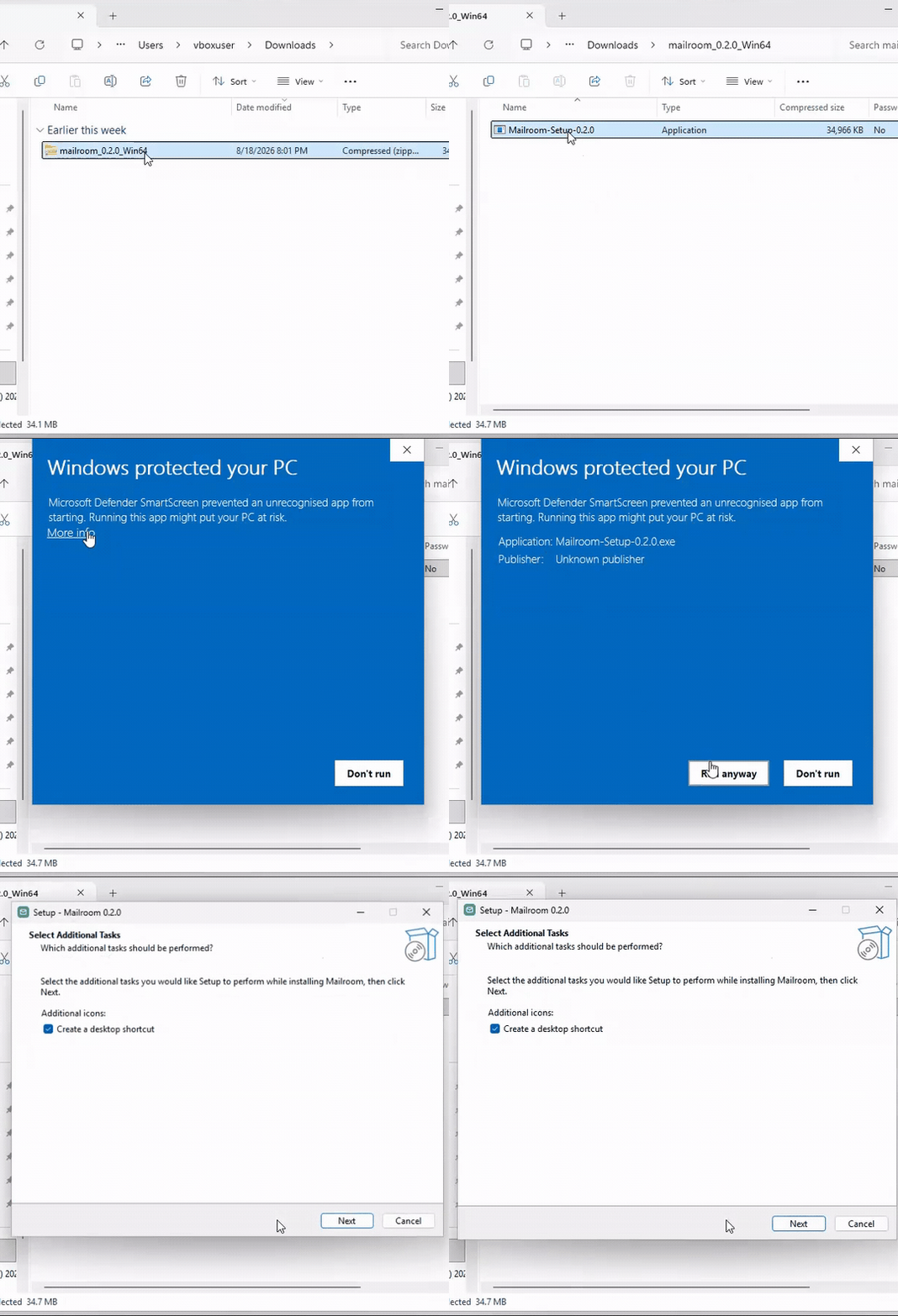
You will see a warning the first time you run the installer, and we would rather you heard it from us than met it cold. Windows shows “Windows protected your PC”, and the permission prompt lists the publisher as unknown.

That is expected at launch. Mailroom is signed with our own certificate rather than one bought from a certificate authority, and Windows only recognises certificates that have built up reputation with it. Until ours has, Windows treats the installer the same way it treats any app it has not seen before — the warning is about who signed the file, not about anything found inside it. To continue: click More info, then Run anyway.

A certificate Windows recognises is on our list. We are not going to pretend the warning does not happen in the meantime.
No. Mailroom reads the envelope — sender, size, date, and attachment names, types and sizes. Never the message body, never the file contents. An attachment’s file name is treated as private data: it is used on your device and never leaves it. All mail processing happens on your device — we never see your messages, senders, subjects or folder names. The KeepSafe engine triages using message metadata and product logic rather than sending your mailbox to a server to be read. The full details are in the privacy notice.
It's a focused launch, not a limitation. We'd rather get one provider genuinely right than spread thin across several. Support for more providers is planned — see the roadmap above.
The trial gives you 14 days, or 10 MB of deletion, whichever comes first. After that you can still open Mailroom and view your last scan — nothing you've already seen disappears. To run a new scan or clean up more mail, you buy a one-time yearly licence. There's no reduced free tier, and the choice to continue is entirely yours. Worth the comparison: Yahoo’s cheapest published storage add-on is $1.99 a month — about $24 a year, every year. A Mailroom licence is £6.99 once for the year, or £9.99 for three mailboxes.* Yahoo pricing as published by Yahoo in July 2026, on its storage subscriptions page. Yahoo sets its own prices and may change them at any time; Mailroom is independent and not affiliated with Yahoo. Yahoo’s figure is listed in US dollars and Mailroom’s in pounds — the two are shown side by side, not converted.
Your licence activates on the machine you bought it on. If you move to a new device, email support and we will move it across for you — there is no repurchase. Your scan data lives locally on each device, so a fresh machine starts with a new scan.
You can open the app and review your last scan offline — your results are stored on your device. Starting a new scan or a cleanup needs an internet connection, both to reach your mailbox and to confirm your licence. If you're offline, Mailroom simply pauses new work and tells you why, rather than guessing.
No. Mailroom is a one-time yearly licence, purchased per account count. Nothing renews automatically and there's no recurring billing. When the year is up, you decide whether to renew.
Mailroom relies on provider-supported access pathways that your email provider makes available to you. You're generally entitled to access and manage your own mailbox, but providers may change how those pathways work over time. If that happens, some Mailroom functionality could be temporarily — or in some cases longer-term — disrupted until compatibility is restored. We keep this transparent in our terms.
Contact

Talk to a real person.

A human reads every message, and we answer as quickly as we can.

Your mail stays on your device — we only ever see what you choose to send us.

Reclaim the room in your inbox.

Start with a free 14-day trial. No card. No subscription. Your mail stays on your device.